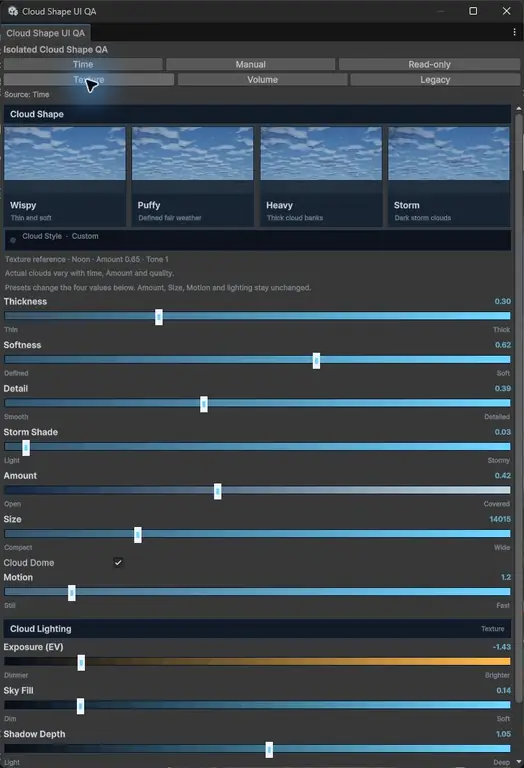
No need to decode Wispy first. Reference pictures and nearby controls make choosing a cloud shape easier to understand.
Day & Night · Lead / UI · Design lead
This episode stars · Day & Night · Lead
Wispy, Puffy, Heavy, Storm. This is a cloud menu, not an English test. Names alone leave newcomers guessing at the sky they will get. We added pictures instead of examining their imagination.
Four cloud options. Reference pictures available before ordering.
The Day and UI teams captured clouds in both product rendering methods. After picking a picture, users can adjust thickness, softness, fine detail and dark shading nearby. Look first; fine-tune to taste.
Cloud Shape choices and controlsActual Unity UI review capture; reference thumbnails, not live scene previews
Adjust a preset and it becomes Custom. No vocabulary exam required.
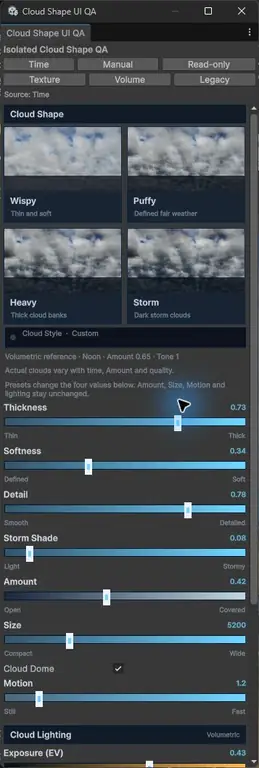
Choosing a shape does not silently change cloud coverage, motion or lighting. Undo restores the selection and its values together. We also checked two-row layouts in narrow panels and a single row in wider ones.
Two-column clouds in the narrow panelActual saved Volume review UI; a different path and width from the wide Texture view.
Twenty-four checked files were integrated, without saving the open map. The thumbnails are reference pictures from specific conditions. They are not live previews of the current scene or evidence of mobile performance.
A menu should explain what is on offer. This one now shows a cloud before asking you to understand its name. Picking a sky calls for your eyes rather than your vocabulary.
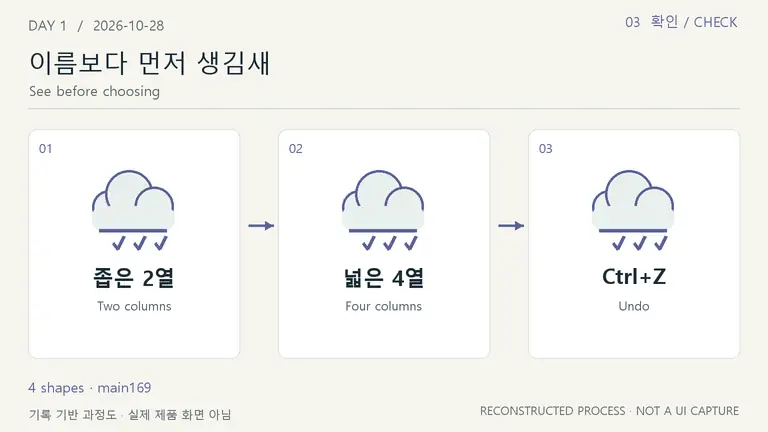
Process 3: See before choosingTwo columns → Four columns → Undo. Editorial diagram reconstructed from the dated records.
Based on actual work; expressions and robot scenes are dramatized. Actual work captures are labelled separately from illustrations.